Google Merchant Center misrepresentation issues occur when Google detects that a website may not meet its guidelines for transparency, trustworthiness, or compliance with shopping policies. Misrepresentation can happen due to various reasons, and here we’ll explore the common causes, how to appeal, and what actions to take during a cooldown period.
What Causes Google Merchant Center Misrepresentation Issues?
Google has strict policies regarding transparency and trustworthiness in its shopping ecosystem. You can refer to the Google Policies page for specific details, but based on our experience working with merchants to resolve misrepresentation issues, we’ve identified three common scenarios where this suspension can occur:
- New Account Suspension: Accounts are sometimes suspended immediately after creation if the website setup is incomplete, lacking essential information like policies, contact pages, or business details.
- Suspension During Google Ads Integration: Misrepresentation issues may arise when connecting Google Ads to Merchant Center, often due to website non-compliance with Google Shopping policies.
- Suspension After Running Ads for a Short Time: Google regularly monitors websites for compliance, so if issues are detected after a campaign has started, your account could be suspended even after initial approval.
How Long Does it Take to Get Approval After a Misrepresentation Issue?
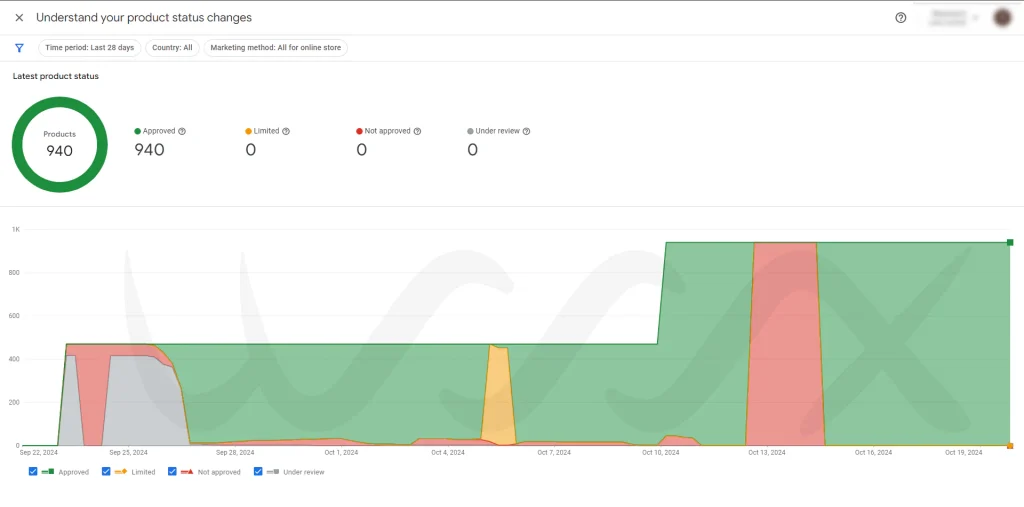
Approval times vary widely depending on the website’s quality, content, and adherence to Google’s policies. It could take anywhere from days to several months to meet Google’s standards fully. Google has a cooldown period policy, where after 2 unsuccessful review requests, additional requests cannot be submitted until the cooldown ends. The first cooldown is one week, the second two weeks, and the third a month. Thoroughly audit your website, including policy pages, refund details, and product descriptions, before each request to ensure compliance.
How to Appeal a Misrepresentation Issue?
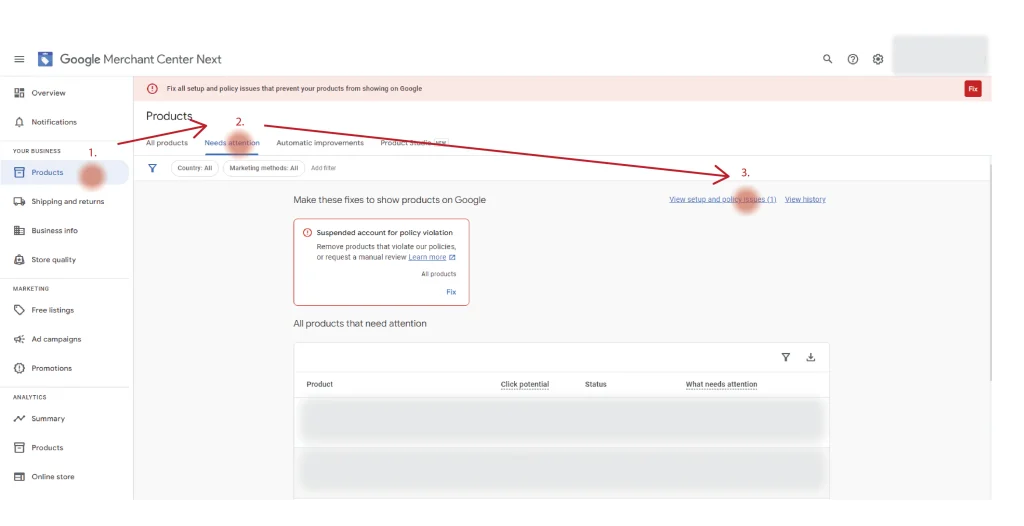
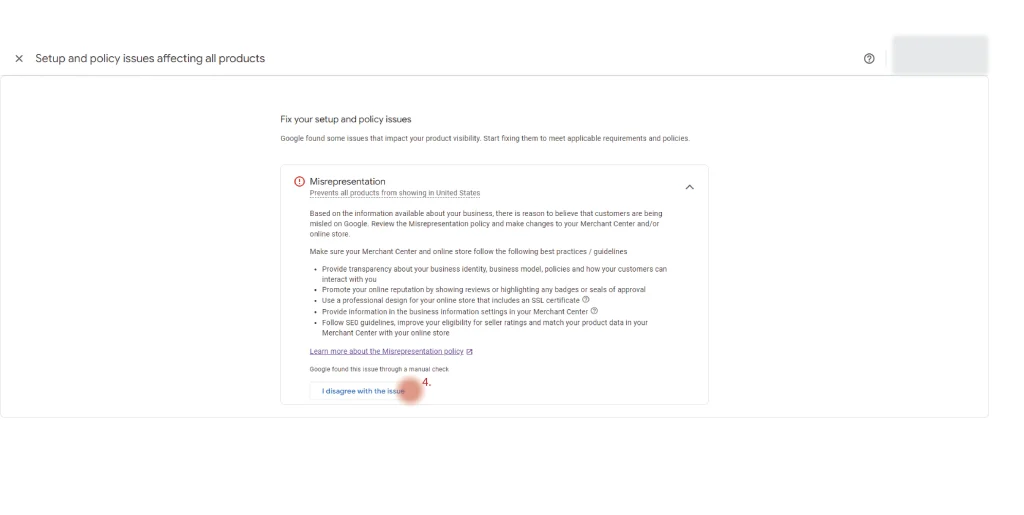
You can appeal by requesting a review within Google Merchant Center:
- Go to Products > Need Attention > View setup and policies issue.
- Under Misrepresentation Issues, select Request Review.
- Be prepared for identity verification before the review process.
Carefully review Google’s policies and ensure your site aligns with all requirements before submitting to avoid repeated rejections.
What Should I Do If I Am in the Cooldown Period?

If you’re in a cooldown period, use this time to conduct a thorough website review. Focus on aligning your website with Google’s standards:
- Ensure all policy pages, product descriptions, and payment information are complete and accurate.
- Make sure your site builds trust, with clear contact information, an easy-to-navigate design, and customer-friendly policies.
- Remember, the cooldown period extends with each failed attempt, so take the time needed to make the necessary adjustments.
Is It Hard to Get Misrepresentation Approval?
Approval depends on your website’s quality, design, and compliance with Google’s policies. As eCommerce platforms like Shopify and WooCommerce make store creation accessible, Google has become more stringent to prevent scams, low-quality stores, and poor user experiences. Using default templates without customization can make approval more challenging. Customizing layouts and creating high-quality images (e.g., through tools like Canva) or unique designs inspired by platforms like Pinterest can improve your chances.
Is Dropshipping Accepted in Google Merchant Center?
Yes, dropshipping is allowed in Google Merchant Center, but approval for dropshipping stores can be challenging. Due to an increase in dropshipping, especially during the pandemic, Google has placed a stronger emphasis on trust factors, unique product presentations, and high-quality website design. Many dropshipping sites are flagged for lacking professional standards, trust indicators, and genuine customer service.
I’m a Dropshipper; How Can I Get Approved for Misrepresentation Issues?
To gain approval as a dropshipper:
- Use unique product images (avoid manufacturer-supplied stock photos).
- Establish trust with good customer reviews, clearly presented business information, and an easy-to-navigate design.
- Write unique product titles and descriptions—avoid copying from suppliers or other websites to build authenticity.
What Should I Do if I Still Can’t Get Approved?
If you continue to experience misrepresentation issues, feel free to reach out to us. With over three years of experience in Google Shopping Ads and Google Merchant Center compliance, our team specializes in resolving misrepresentation issues. We offer a transparent pricing model with no hidden fees and provide a 30-day post-service support period to help you maintain compliance. You may visit to our Homepage for further detail.